
Hi,
In our IT environment we don’t give “admin” rights to the normal users and they can’t enable/disable, install/un-install anything.
Today one of our users was having some problem with Wi-FI and to troubleshoot it i need to “enable” and “disable” Wi-Fi network adapter few times, but to enable or disable the network adapter i required to insert the “Administrator” username and password every time {remember my user don’t have admin privileges}.

This make me mad, i Inserted the username and password approx 10 times {somehow the problem was not resolved and with every change i need to disable and re-enable the wi-fi}, and I also don’t want to login as administrator to the system. Then i thought there must be a PowerShell way to do this and after few minutes of R&D i found the solution of my problem.
Problem:
user don’t have admin privileges to enable/disable any network adapters, so while troubleshooting if you need to enable or disable the network adapter it always ask for Administrator account to do the task.


Solution :
Run PowerShell as Administrator First
Search for PowerShell and then Right click and choose “Run as administrator”

When PowerShell runs as Administrator, the PS path changed to “C:\widows\System32” and in title bar you can see the “Administrator” is written.

We will be using WMI to enable and disable the network adapters.
I do remember that the WMI class for network adapter is start with win32_Network but i forget the full name of the class. lets search it first
1: Get-WmiObject -List | where { $_.Name -like "win32_network*"}in above command we are listing all class in WMI and choosing those to display which starts with Win32_Network
It shows the all classes those are start with Win32_Network , the class which we need is Win32_NetworkAdapter
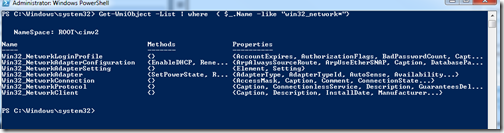
ok, lets query the Win32_NetworkAdapter class
1: Get-WmiObject -Class win32_NetworkAdapterand you see it shows the list of all network adapter installed in the system.
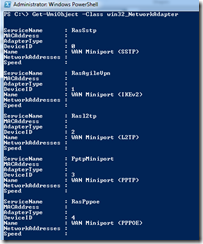
lets filter it more and choose only Name of Adapter to display
1: Get-WmiObject -Class win32_NetworkAdapter | select namewe piped the command further to Select-Object cmdlet and choose only to display name of the Network adpaters
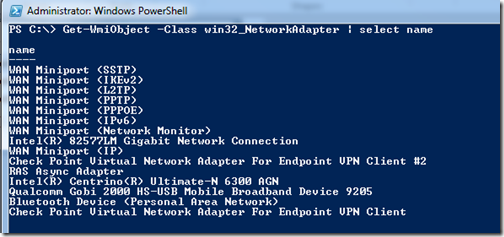
Currently I am interested in enable/disable my Wi-Fi network Card. the Name of the my Wi-Fi network adapter is “Intel(R) Centrino(R) Ultimate-N 6300 AGN”
Now I will select only my “Intel(R) Centrino(R) Ultimate-N 6300 AGN” network adapter using where-object cmdlet and in $_.Name i am searching for that Name is Like something “ultimate-n”
1: get-WmiObject win32_networkadapter |where { $_.name -like "*ultimate-n*"}Now it showing only one Network Adapter and its showing the network adapter which i want to disable/enable. Our command is working fine till now.
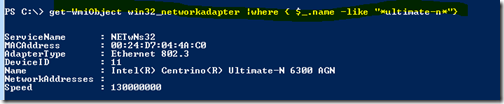
Now I am going to put the above command in to a variable $wifi.
1: $wifi = get-WmiObject win32_networkadapter |where { $_.name -like "*ultimate-n*"}and lets also test the variable too.
All working fine ….
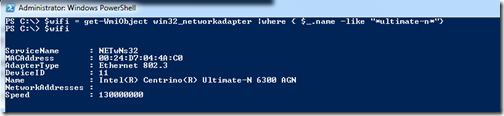
now pipe the $wifi to get-member cmdlet and check what the methods do we have
1: $wifi | Get-Member -MemberType MethodNetworkAdapter has 4 methods but we are interested in only 2 for now, the enable and disable method.
To disable a Network adapter we need to use disable()
To enable a Network adapter we need to use enable()

lets try 🙂
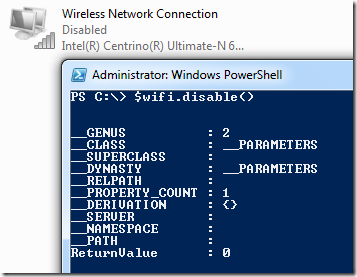
first Disable it
$wifi.disable()working
not enable it
1: $wifi.enable()it enabled 🙂
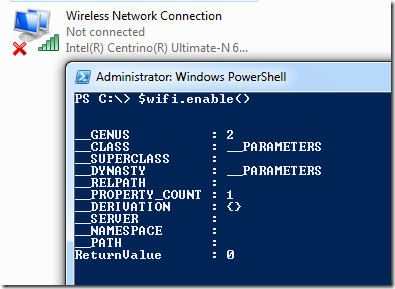
Now we can enable/disable network adapters number of times without inserting “Administrator” username and password again and again.
I hope it save someone’s time 🙂
Thanks
Aman Dhally


Not working on XP systems with PowerShell 2.0 :
Method invocation failed because [System.Management.ManagementObject#root\cimv2\Win32_NetworkAdapter] doesn’t contain a method named ‘disable’.
Hi Les,
I checked, all of my scripts on Windows7. Don’t have any XP system in my environment to troubleshoot this 🙁
Sorry.
Aman