
Hi,
Today I check my SCOM windows event log and saw some error logs with “EVENT ID 2000”. Complaining about that the one of my SERVER is not a part of SCOM Management Group.
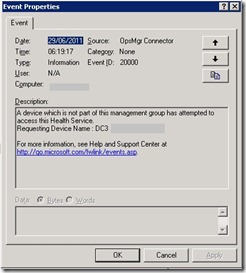
Today I check my SCOM windows event log and saw some error logs with “EVENT ID 2000”. Complaining about that the one of my SERVER is not a part of SCOM Management Group.

So Lets try to resolve it .
Step 1
My First Step is Login to the server who is generating an alerts. First I removed the SCOM Agent and then I reinstall again manually.
Step 2
Now in SCOM console to to “Administration” then click on “Pending Management” and you may see the name of the server on which we just installed the SCOM AGENT.
Right click on Server and click on “Approve” 
Now wait for 3-4 minutes to update the changes in SCOM and after few minute you will see that server is appeared in SCOM and it is healthy now.
And you will see “EVENT ID 29103” saying that our problematic server is now successfully able to contact with SCOM server.
I hope it may helps someone
Thanks
Aman Dhally