
Hi,
Good Evening Guys.
I hope you had enjoyed my yesterday post about Powershell and iTunes.
In my point of view the main purpose of scripting is , making our lives easy, click free, error free and have some fun in spare time using automate tasks and automation improve productivity and efficiency.
I spent most of my time on “Powershell console” or in “Powershell ISE Editor”.
Sometime while you are working on a script or testing sometime at the same time, you remembered that tomorrow is your friends birthday or you suppose to meet with some tomorrow, at that point , you open your outlook and create a calendar meeting with a reminder.
I often end up to this situation and on the same time, I remembered something but i forget to add it to my calendar as a meeting. This is frustrating at-least for me.
I want to create a calendar invites using my Powershell Console, I was thinking what if , if i create a Calendar event with basic parameters, so that i can use it on the fly and then never forget any meeting.
First I thought i create a script but that is not a solution, then i end up by writing a Powershell function.
You can download the script from : http://gallery.technet.microsoft.com/scriptcenter/Create-Meeting-is-MS-f117778d
How this works,
Please download the script and it has a complete comment base help.
I am using “Outlook.Application” com object in this Powershell functions.
Let me show.
The name of the function is “Add-CalendarMeeting” and it has three mandatory parameters , –Subject , –Body, and –Location.
In below command i run the Add-CanendatMeeting script code in Powershell.
|
Add-CalendarMeeting –Subject “Screenshot”–Body “testing Function”–Location “My Desk”–EnableReminder $false |

and meeting named-“Screenshot” appeared in my outlook Calendar.
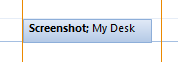
Lets open the “Screenshot” meeting and see what it has.
You can see, the meeting “ScreenShot” doesn’t has Reminder Set, and you can check we set the –EnableReminder to $false in above script code. and the Subject,Location, and body exactly match with our above script block.
By default this function create a meeting of duration for 30 Minutes.
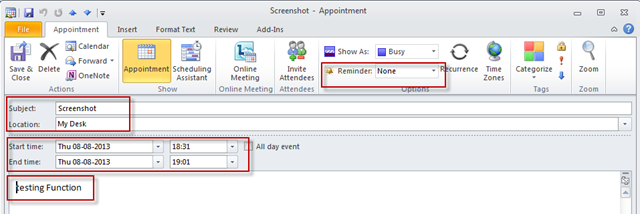
Lets run the another example.
In the below script code, i am creating an all day event.
Run the script code.
|
Add-CalendarMeeting –Subject “Show Power of POSH”–Body “Be ready for the the fun”–Location “Pataya”–AllDayEvent $true |

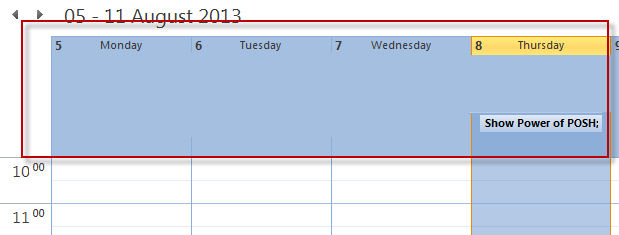
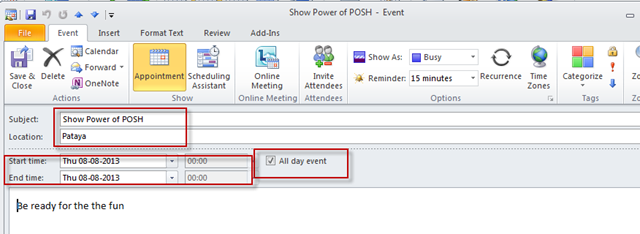
You can see that the meeting is appeared in my all day window. Let open the meeting properties and see what we have got.
You can see it has all the properties which we passed to the Add-CalendarMetting function.
Note: Make sure whenever you create a ALL Day Event using the function then set –EnableReminder to $false.
Lets see another example.
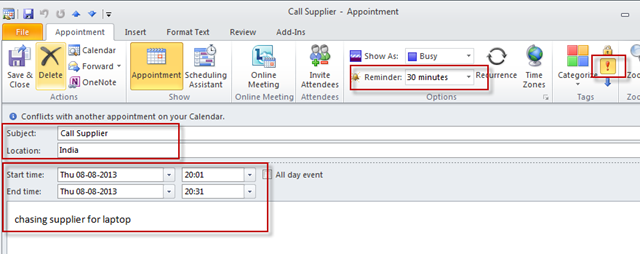
Create a meeting on a specific date and time with the duration of 30 minutes and set the priority to HIGH and set the reminder to show 30 minutes before meeting starts.
|
Add-CalendarMeeting –Subject “Call Supplier”–Body “chasing supplier for laptop”–Location “India”–MeetingStart “08/08/2013 20:01”–MeetingDuration 30 –Importance 2 –Reminder 30 |
run the above function in to the Powershell.

and here are the result. and let open this meeting and see it properties.

You can see in the below screenshot that, priority are set to HIGH , and reminder are set to 30 Minutes and it is starting on the time which we has specified in the above script code.
Need to remember the Parameter –Importance value and the valid arguments.
|
-Importance |
|
|
Value |
Meaning |
|
0 |
Low |
|
1 |
Normal |
|
2 |
High |
and the valid argument values for the parameter –BusyStatus
|
-BusyStatus |
|
|
Value |
Meaning |
|
0 |
Free |
|
1 |
Tentative |
|
2 |
Busy |
|
3 |
Out of Office |
You can download the script from : http://gallery.technet.microsoft.com/scriptcenter/Create-Meeting-is-MS-f117778d
I hope that you may like this post.


Hi ,
How to invite attendees?
Thanks
Hi,
Can you create a script to get all the calendar meeting for the next day(s) or week(s) as well?
Thank you in advance.
Regards,
Neil